Learning Agentic AI and RAG course Part 2
This is the condensed version of Parts 2 to 5 of my notes on the IBM RAG & Agentic AI course on Coursera (Part 1 covered the LangChain basics). The original notes were long, so this is the short version.
Note: this series is my personal summary of IBM's RAG & Agentic AI course on Coursera. The course materials, labs, and the screenshots in these posts belong to IBM / Skills Network — everything here is my own beginner-friendly rewrite for learning purposes.
RAG: giving the model your documents
Why RAG beats pasting everything into the prompt
ELI5: modern models accept huge contexts (128k tokens), but pasting a whole book into the prompt is slow, expensive, and drowns the answer in noise. RAG instead finds the few relevant pages and hands only those to the model. It gives you three things paste-everything can't: accuracy (answers grounded in real data), freshness (live data, no retraining), and traceability (you can cite exactly which chunk the answer came from).
How text becomes numbers
Two conversions happen:
- Tokenization cuts text into pieces and maps each to an integer ID — but those IDs carry no meaning. They're just seat numbers in a stadium.
- Embedding is the meaningful one: a neural network turns text into a vector (a list of floats) where similar meaning lands close together in space. That's why "How do I reset my password?" sits near the chunk that explains password resets, even if no words overlap.
The 5-step RAG pipeline
- Chunk the document into small focused sections.
- Tokenize each chunk into IDs.
- Embed those IDs into vectors.
- Store & search the vectors in a vector database — the user's question becomes a vector too, and the database finds the closest matches.
- Generate — retrieved chunks + question go into one prompt, and the LLM answers grounded in them.
The #1 pitfall lives in step 4: the query must use the same embedding model as the stored chunks, or "closest" means nothing.
Picking the right similarity metric
The metric choice quietly decides what search returns:
- Cosine similarity — measures only the angle between vectors, ignoring length. Best for text: a 500-word blog post about Python should match a 5,000-word docs page about Python.
- Dot product — angle and length. Best for recommenders: it boosts popular, high-confidence items.
- L2 (Euclidean) — straight-line distance. Best for coordinates and physical data, and it unfairly punishes long documents.
Using the wrong one is a bug that never throws an error — it just quietly returns the wrong results.
Chroma in one snippet
The whole CRUD + filtered-search loop in a few lines:
import chromadb

client = chromadb.Client()
collection = client.create_collection("kb_store")

collection.add(
    documents=["LangChain enables modular chains."],
    metadatas=[{"framework": "langchain"}],
    ids=["doc_01"],
)

# Semantic search + a metadata filter + a full-text filter
collection.query(
    query_texts=["what is langchain?"],
    n_results=3,
    where={"framework": "langchain"},
    where_document={"$contains": "LangChain"},
)
Key distinction: get() fetches exact documents by ID; query() does semantic search. And don't blindly trust top-k — combine it with filters.
HNSW: how search stays fast at scale
Comparing a query against millions of vectors is a brute-force scan. HNSW speeds it up to logarithmic time with a multi-layer highway system through vector space: expressways for big jumps between regions, local streets for the final fine search.
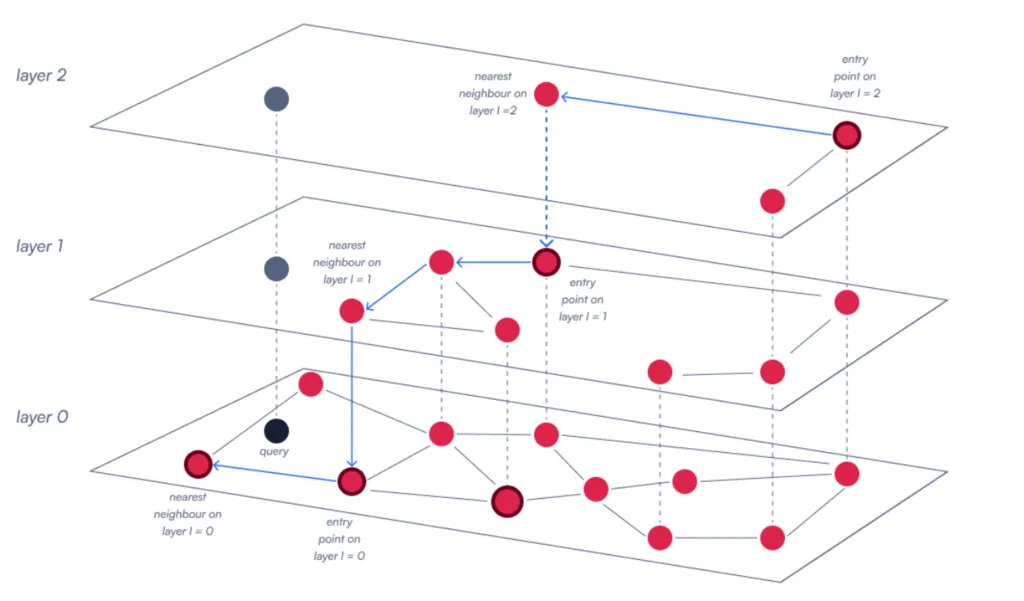
The one knob to remember: ef_search — how hard HNSW searches before giving up. Higher = more accurate but slower queries.
Advanced retrievers: beyond plain top-k
| Retriever | The problem it solves |
|---|---|
| Vector search | Finds similar meaning |
| BM25 | Finds exact keywords (docs, IDs, error codes) |
| Document Summary | Searches huge collections via LLM-generated summaries |
| Auto-Merging | Matches small chunks, returns the larger parent section |
| Recursive | Follows references/citations to other documents |
| Query Fusion | Searches multiple rephrased versions of the question and merges results |
The practical default is hybrid: combine vector + BM25 (e.g. 70/30 weighted), which covers both "similar meaning" and "exact words."
The big lesson of this section: don't assume top-k vector search is always enough — choose the retrieval strategy based on what you're searching for, and measure retrieval quality before blaming the LLM.
Multimodal: models that can see and hear
What "multimodal" means
ELI5: most models are one-trick ponies — a chatbot reads text, an image classifier looks at pictures. A multimodal model handles several at once: hand it a photo and a question about the photo, and it deals with both together.
- Generative AI — it makes things, not just sorts things.
- Multimodal AI — it can see and hear and read.
- Both combined — show it a photo, it writes you a story about it.
The universal pattern behind every vision app
Every vision app in the course is the same three steps: encode the image to base64, attach it to a chat message, ask your question. Chat APIs speak JSON (text-only), so the image travels as a base64 string inside a data:image/jpeg;base64,... URI. The message just has two parts:
messages = [
    {
        "role": "user",
        "content": [
            {"type": "text", "text": "Describe this photo"},
            {"type": "image_url",
             "image_url": {"url": "data:image/jpeg;base64," + encoded_image}},
        ],
    }
]
model.chat(messages=messages)
The same call covers captioning, counting objects, assessing flood damage on insurance photos, and reading nutrition labels — only the question changes.
The four apps I built in the Coursera course
Style Finder — Upload an outfit photo; it tells you what the items are and where to buy them. Each image becomes two things: a base64 string for the LLM and a ResNet50 feature vector for similarity search. Cosine similarity finds the closest catalog match (threshold 0.8), then the multimodal model describes the items and cites prices. Conceptually it's multimodal RAG — the RAG section retrieved text chunks with text embeddings; this retrieves catalog rows with image embeddings.
AI Nutrition Coach — same model, different prompt. The entire "nutritionist expertise" comes from a rigid six-part prompt format (identification → portions & calories → totals → nutrients → health evaluation → mandatory disclaimer), plus few-shot examples so the model can't misread the format. Lesson: the prompt is the product.
AI Meeting Assistant — audio goes in, structured minutes come out. Three models, three jobs: Whisper transcribes the recording (30-second chunks), a Granite pass cleans up spoken jargon ("four zero one k" → 401(k)), and a LangChain chain writes the summary + task list. Each step is independently testable.
TTS Storyteller — the smallest project: a topic goes in, the LLM writes a beginner-friendly story, and gTTS reads it aloud. Text in, voice out.
Where multimodal still struggles
- Multimodal hallucination — a text model can invent facts; a vision model can describe objects that aren't even in the image.
- Cost — running multiple encoders is never free.
- Bias and privacy — training data could skews, and vision/audio models ingest biometric data (faces, voices).
Agents: giving the model hands
What an agent actually is
ELI5: everything so far was question in → answer out. An AI agent is a model with hands: tools it can call, memory it can keep, and a loop it can run until the job is done. Instead of guessing the weather in Paris, it calls a weather API, reads the result, then answers.
The part that surprises people: the LLM executes nothing. It's a lawyer who can only write letters — it writes a request ("run get_weather with location=Paris"), your code does the actual work, and the result goes back into the conversation. Agent = LLM + tools + a loop. That's the whole idea.
Tool calling in LangChain is the @tool decorator:
@tool
def get_weather(location: str) -> str:
    """Fetch current weather for a location."""
    return f"14°C in {location}"

llm_with_tools = llm.bind_tools([get_weather])
ai_msg = llm_with_tools.invoke("What is the weather in Paris?")

if ai_msg.tool_calls:                       # the model REQUESTS
    result = get_weather.invoke(ai_msg.tool_calls[0]["args"])   # YOUR code executes
When NOT to use an agent
The rule of thumb worth taping to your monitor: start simple (plain LLM calls), default to workflows (when you need consistency and audit trails), deploy agents selectively (only for tasks that genuinely require runtime adaptation). Agents burn 10–100× more tokens than static workflows, and safety-critical or heavily regulated systems are the wrong home for autonomy.
LangGraph: workflows that can loop
A LangChain chain is a row of dominoes — it always ends. A LangGraph is a board game: the state decides which node runs next, and some can send you back. That loop enables everything that follows:
- Reflection — generate a draft, have a critic node review it, loop until good. (Can't fix hallucinations it doesn't know about, though.)
- Reflexion — same, but the critic is grounded in external evidence (tool/search results) before revising.
- ReAct — think → act → observe → repeat, until the model decides it can answer. Modern agents run this on LangGraph's prebuilt
create_react_agent.
DocChat: the flagship project
My favorite of the whole course. Upload an 86-page environmental report, ask a question, and get an answer from a system that fact-checks itself first:
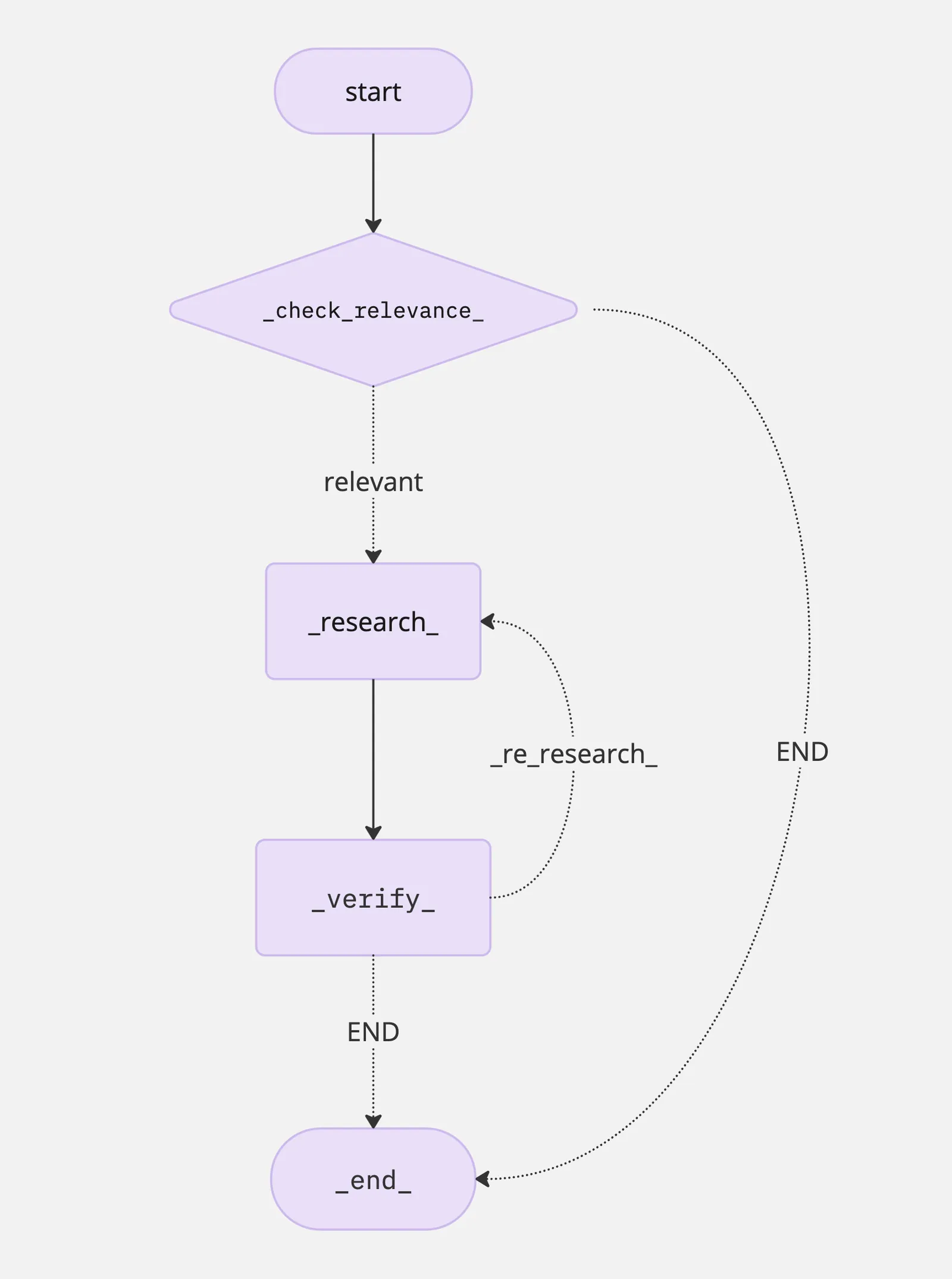
The loop: a hybrid retriever (BM25 keywords + vector embeddings) fetches chunks → a Research Agent drafts an answer → a Verification Agent checks it against the document in a fixed YES/NO report format → if the report says "Supported: NO", the graph loops back to research. Generate, verify, re-research — that's RAG plus the reflection loop: agentic RAG.
Which framework?
| Framework | Mental model | Pick it when… |
|---|---|---|
| LangGraph | Graph of nodes/edges you assemble | You need custom control flow and inspectability |
| CrewAI | Role-based team (agents, tasks, crew) | The problem looks like a team with typed handoffs |
| AG2 (AutoGen) | Multi-agent conversation | The problem looks like a meeting; prototyping fast |
| BeeAI | Agents bound by enforced requirements | Production systems that must meet contracts |
Four lessons every framework repeated: cap the loops (max_turns, max_invocations), pin temperature=0 for verification/routing nodes, make termination signals explicit and machine-readable, and keep tool authority (LLM requests) separate from tool execution (your code decides).
MCP: the universal port for AI
Why agents need protocols
ELI5: around 2024, every framework (LangGraph, CrewAI, AutoGen, BeeAI) had its own tool format — like every appliance needing its own wall socket. Agentic protocols (MCP, A2A, ACP, ANP, AG-UI, AP2) fix this the way USB did: one plug shape everyone follows. One boundary to keep in mind: protocols are the wire, not the brain — they define message formats and discovery, not orchestration. That's still your LangGraph/CrewAI code's job.
MCP in one minute
Before MCP, connecting an LLM to email, files, or a database meant a custom connector per service. With MCP, a tool exposes itself once in a standard format and every MCP-speaking agent can use it.
Three roles: the host (your app) runs clients (one per connection), which talk to servers over stdio or HTTP. A server exposes three primitives:
| Primitive | Who controls it | Nature |
|---|---|---|
| Tools | The model | Active — executes actions |
| Resources | The application | Passive — read-only data by URI |
| Prompts | The user | Reusable parameterized templates |
A server in one snippet
With FastMCP, a tool is just a typed function with a good docstring:
from fastmcp import FastMCP

mcp = FastMCP("CalculatorMCPServer")

@mcp.tool
def add(a: int, b: int) -> int:
    """Add two integers together."""
    return a + b

mcp.run(transport="http", host="127.0.0.1", port=8000)
The key pattern is discovery before invocation: the client calls list_tools() and reads each tool's name, description, and input schema at runtime — nothing is hardcoded.
The three transports
- In-memory — pass the server object directly; for dev and tests.
- STDIO — the client launches the server as a local subprocess and talks over stdin/stdout; for local tools.
- HTTP — the server becomes a web service for remote, authenticated setups.
Same MCP operations on all three — only the wire changes.
The security patterns
The security lab maps one-to-one onto the agents risk matrix:
- Roots — a filesystem sandbox: every file-touching tool validates the path against the allowed directory (LLMs will eventually ask for
../../etc/passwd). - allow / ask / deny permissions — read files auto-run, writes ask a human, deletes are denied every decision lands in an audit log, including denials.
- Elicitation — destructive operations pause and request typed, schema-validated approval from the user before running.
Plugging MCP into the agent stack
With langchain-mcp-adapters, an MCP server's tools become LangChain tools that plug straight into the agent from the previous section:
tools = await load_mcp_tools(session)          # live tool catalog from the server
agent = create_react_agent(model=llm, tools=tools)
await agent.ainvoke({"messages": "whats 8 + 7? use tools"})
And MultiServerMCPClient aggregates several servers (local + remote) into one flat tool list with a single get_tools() call. The agent code didn't change — the tool supply chain did. That's the closing idea of the whole series: the agent is still the same worker; MCP just gives it a bigger, always-current toolbox.
The one-paragraph summary
RAG finds the right pages before the model answers. Multimodal lets the model see and hear, using the same "encode → message → ask" pattern for every app. Agents add tools and loops so the model can act, check its own work, and retry. MCP standardises how those tools are plugged in, so one integration works everywhere. If you build one thing from all this, build DocChat's skeleton — hybrid retrieval, draft, verify, loop — with your own documents.